
Description
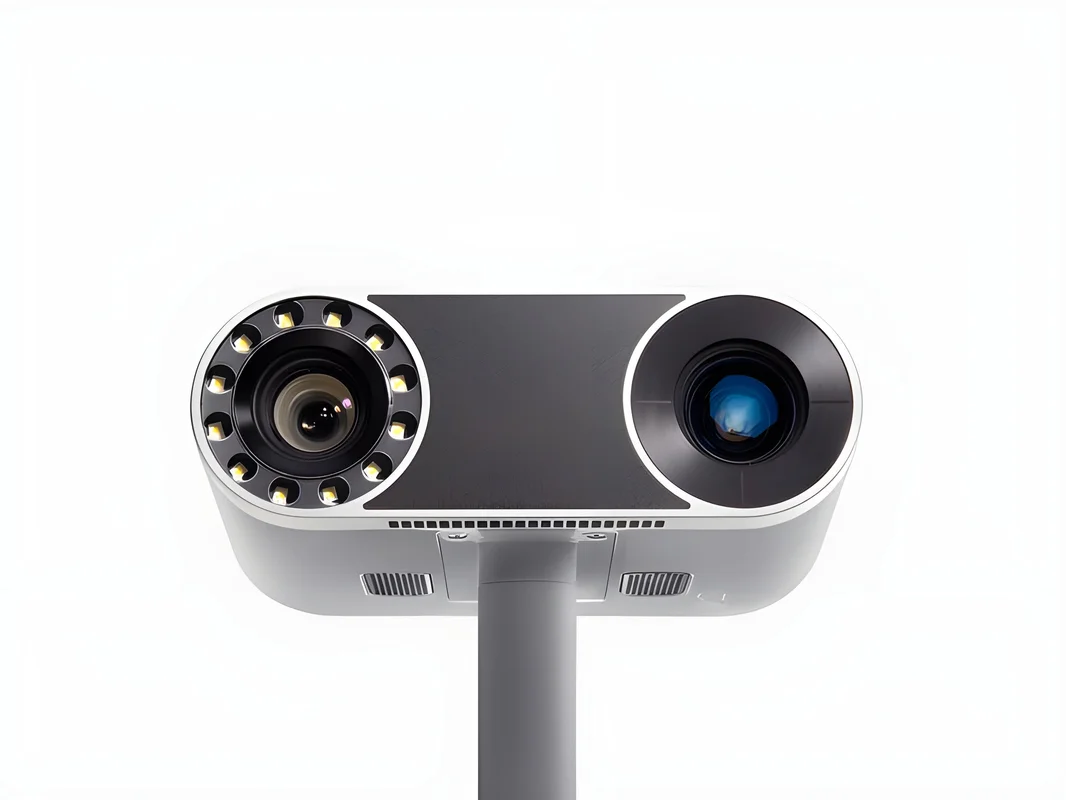
Artec Leo 3D Scanner (EDU)
Artec Leo Wireless 3D Handheld Scanner With Built-In Touchscreen (EDU)
Cultivate advanced learning in the classroom–whether you’re shaping the next generation of engineers, doctors, or forensic listed is the Manufacturer’s Suggested Retail Price (MSRP). Looking for a good price on Artec 3D scanners? See if you qualify for any special discounts or promotions. Contact us
Features
- Artec Leo 3D scanner
- Artec Studio license plus FREE pack of up to 50 licenses
- 2 years of free major software upgrades
- 2 years free access to selected Artec Academy (marked ‘EDU’)
Specifications
| Type | Handheld 3D Scanner |
|---|---|
| 3D Point Accuracy | Up to 0.1 mm |
| 3D Resolution | Up to 0.5 mm |
| 3D Accuracy Over Distance | 0.1 mm + 0.3 mm/m |
| HD Mode | Yes |
| Hybrid Geometry and Texture Tracking | Yes (captures color) |
| Data Processing Algorithm | Geometry and texture-based |
| Data Acquisition Speed | Up to 3 million points/second |
| Made in | Luxembourg |
Brochure
For more information, please read the Artec Leo brochure
What our Expect Think
- Educational Focus: Designed specifically for academic use, offering an affordable solution for learning and research.
- Real-Time Scanning: High-speed, accurate 3D scanning for dynamic classroom environments.
- User-Friendly: Intuitive interface makes it easy for students and educators to operate.
- Portable & Wireless: Ideal for both classroom and fieldwork with wireless, on-the-go capabilities.
- Cutting-Edge Technology: Delivers top-tier precision and quality for educational projects and studies.
Q&A
Q: What is the Artec Leo 3D Scanner (EDU)?
A: The Artec Leo 3D Scanner (EDU) is a specially priced version of the Artec Leo, designed for educational use, offering advanced 3D scanning capabilities for students and educators.
Q: How can the Artec Leo 3D Scanner (EDU) benefit students?
A: It enables hands-on learning of cutting-edge 3D scanning technology, perfect for courses in design, engineering, and digital modeling.
Q: Is the Artec Leo 3D Scanner (EDU) easy to use?
A: Yes, its intuitive interface and seamless setup make it easy for both beginners and advanced users to create accurate 3D models.
Q: Who is eligible to purchase the Artec Leo 3D Scanner (EDU)?
A: The EDU version is available to academic institutions, educators, and students looking for a powerful and affordable 3D scanning tool for educational use.
Maintenance Tips
- Clean Regularly: Use a microfiber cloth to wipe the scanner and lenses, removing dust and fingerprints for clear scanning.
- Lens Protection: Gently clean the lens with a lens-safe cleaner and soft cloth to prevent scratches.
- Battery Care: Charge the battery fully before use and avoid overcharging. Disconnect when fully charged to extend battery life.
- Proper Storage: Store the scanner in a dry, cool place, preferably in its protective case to avoid damage when not in use.
- Software Updates: Keep the software updated for better performance, bug fixes, and access to new features.
- Inspect for Wear: Check cables and connectors for any signs of wear or damage, especially after frequent handling.
- Calibration: Periodically calibrate the scanner to maintain its accuracy, especially in educational environments.


Reviews
There are no reviews yet.